
"It feels like working alone, even though I have a team"
"Ton" is a developer at a 15-person startup whose team now works from home almost entirely. His work is fine, but the workday is unusually quiet. He talks to the team only at the morning standup on a video call, and after that it is all chat messages. When he gets stuck on a bug and wants to ask a senior colleague, he isn't sure whether they are in a meeting, so he types a question and waits. Some days the answer arrives in the afternoon.
His manager doesn't know Ton is stuck either, because they can't see each other the way they could in a physical office.
This is common. Buffer's State of Remote Work 2023 report, which surveyed 3,000 remote workers worldwide, found that 23% named loneliness as one of the difficulties of remote work. Among those who said they don't feel connected to their colleagues, 56% said the reason was a lack of opportunities to build relationships.
Many teams start searching for "virtual office" and find that the results mix two different meanings.
Virtual Office has 2 meanings
Meaning 1: A business address and office services
In Thailand, the term "virtual office" usually refers to a service from a workspace provider that gives a business an address for business cards and websites, mail-handling services, and, in some locations, an address that can be used to register a company. This service helps with a business's physical presence, but it does nothing to make it easier for a team in different places to talk to each other.
Meaning 2: An online office your team works in together
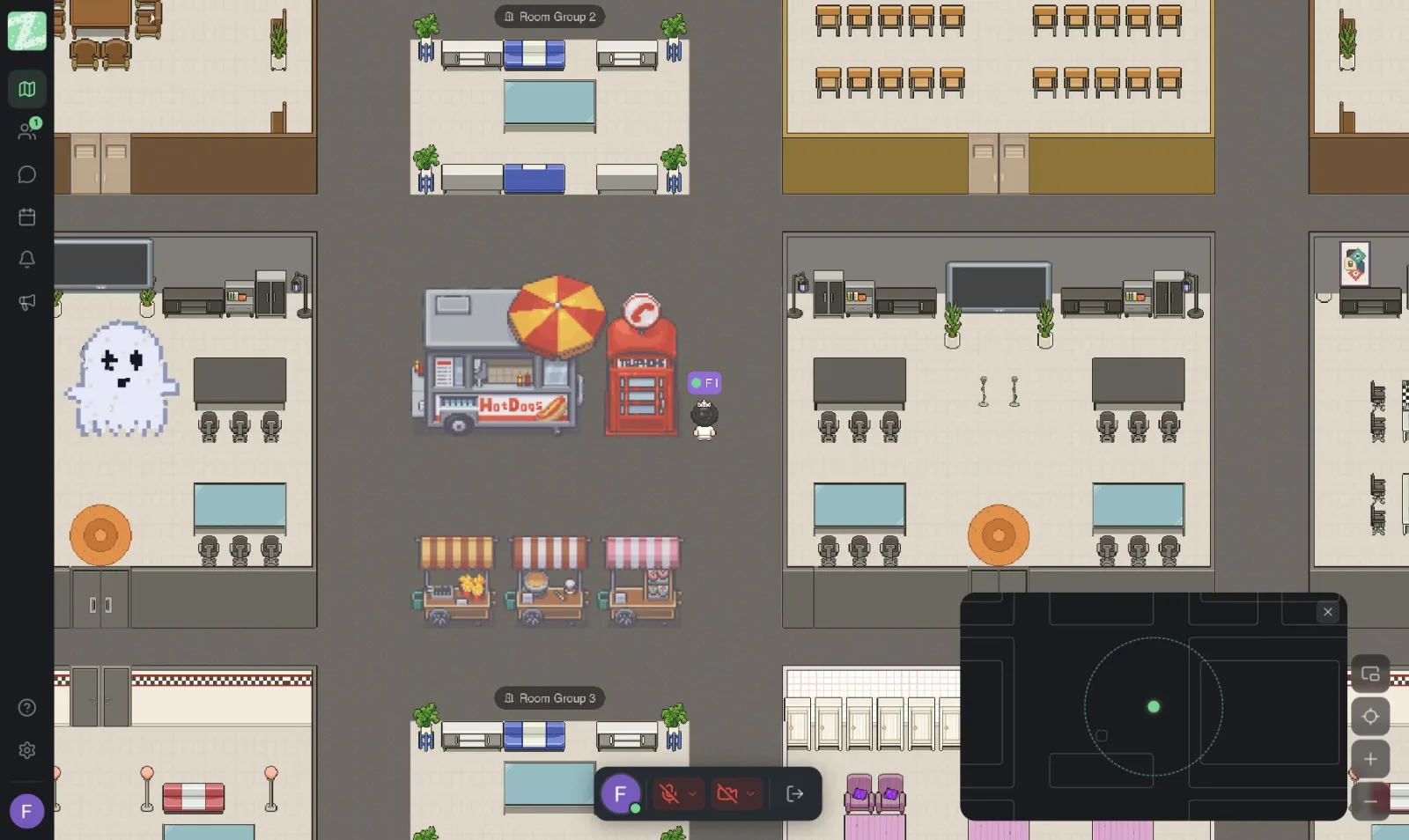
The other meaning is a digital workspace that a team keeps open during the day. Each person has an avatar and can walk around the office map. When you walk close to a teammate, your audio and video connect automatically. There are meeting rooms, private zones, and team chat in one place. This is a "virtual office for teams," also called an "online office," and it is what Zyra World does. For an overview, read What is an online office?
In short: if you need an address on your paperwork, look at the first kind. If you want your team to feel like they are working together, look at the second.
How a virtual office for teams helps Ton
See who is where
In Zyra, members of a workspace can see each other's avatars and online status. So Ton knows right away that his senior colleague is sitting in the team corner, not in a meeting room.
Walk over and ask right away
Proximity-based audio connects voice and video automatically when avatars get close to each other. Ton walks over, asks his two-minute question, and goes back to work. No link to send, no calendar invite.
Rooms, private zones, and screen sharing
Teams can create rooms for meetings, teamwork, or focused conversations. Anything that needs privacy can move to a private zone. When you need to look at code together, you can enter a room and share your screen without managing a meeting link.
Organized team chat
Zyra has direct messages, channels, group chat, thread replies, and file sharing. Important updates stay in channels that everyone sees in the same way.
An office that belongs to your team
Start from a map template, then add furniture, decorations, and interactive objects. Everyone can customize their own avatar, so the office reflects your team's personality.
Why Zyra, and how is it different from Google Meet?
Ton's team already uses Google Meet, and they can keep using it as before. Google Meet is an excellent video meeting tool. Participants join with a link or a meeting code, it works in the browser, and you can schedule meetings with an agenda and RSVPs. That makes it a good fit for meetings scheduled in advance, especially with clients and people outside your organization.
Zyra does a different job: it is an office that stays open all day.
- Google Meet: Starts with scheduling and sending a link. Best for meetings with an agenda.
- Zyra: Starts with seeing each other and walking over. Best for short conversations during the day, working alongside each other, and the feeling that the team is together.
Zyra's strengths for Thai teams include a Thai and English interface, browser-based use with nothing to install, and a development team based in Bangkok (Maximum Soft Co., Ltd.).
What kinds of teams is a virtual office good for?
- Fully remote teams that only talk in chat and can't tell who is available
- Hybrid teams that want people working from home to stay part of the group
- Tech and product teams that need quick Q&A and frequent on-screen work reviews
- SMEs and startups that want a team culture without renting a big office yet
- Universities and instructors, since Zyra states in its mission that it wants to create a space where students, teachers, and staff can work together
5 things to check before choosing a virtual office
- Easy to use on day one. If you have to spend days designing a map before you start, the team may give up before they get any benefit.
- Whether you have to install anything. Zyra runs in the browser, with nothing to install.
- Language. A Thai interface helps the whole team actually use it.
- Privacy. Zyra's privacy policy states that audio, video, and screen sharing are transmitted live and are not recorded or stored. It also states that Zyra does not sell personal data, does not use users' audio, video, messages, or files to train AI models or for advertising, and that primary data is stored in Singapore (see the Terms and policies).
- How pricing works. Some platforms charge per person, others charge a flat rate per space. For the full checklist, see How to choose an online office for your team.
Get started in 3 steps
- Create a workspace. Sign up at app.zyra-world.com with Google, Apple, or email, then pick a template.
- Invite your team by link or email. Set roles and permissions, and revoke access immediately when someone leaves the team.
- Set a few small ground rules. For example, everyone enters the office at 9 a.m., you hold standup in the same corner, and you use a focus zone when you don't want to be disturbed. For more ideas, see 5 ways to run effective online meetings and remote onboarding for new employees.
Zyra plans at a glance
- Free: Teams of up to 25 people, 1 space, 3 rooms, 2 GB, proximity chat, and direct messages
See details at Pricing and plans and Features.
Frequently asked questions
Are a virtual office and an online office the same thing?
In the context of team work, the terms can be used interchangeably. But in Thailand, "virtual office" is also used for company registered-address services, so check which kind a provider means.
Can I use Zyra as my company's registered address?
No. Zyra is collaboration software, not a business address service.
Do I need to install anything?
No. You can open it in your browser at app.zyra-world.com.
Do I need a plan other than Free?
No. You can start using Zyra for free with a team of up to 25 people.
Help your team feel together again
A virtual office doesn't fully replace a physical one, but it helps bring back the feeling of being together for teams working in different places. You can start using Zyra for free with a team of up to 25 people.
Start building your team's office
Try Zyra with your team
Free for up to 25 members. It runs in your browser, so there is nothing to install.