
Best for working close together as a team: Zyra World | Best for exploring a shared space you can see: Gather | Best for structured collaboration: Microsoft Teams This guide compares the best virtual office platforms in 2026 by how teams talk, share work and spend time together, not by how impressive an empty space looks.
This article is written by the Zyra World team, who build Zyra, so Zyra is listed first. Details on the other platforms are based on the usage models each provider publicly describes. Check with each provider again before you decide.
The short version
- Zyra World is among the best virtual office platforms for teams that want proximity-based voice, avatars, chat and screen sharing.
- Gather suits teams that like exploring a shared space they can see, while WorkAdventure suits teams that want a spatial environment that is open code and self-hostable.
- Microsoft Teams and Discord focus on channels and calls rather than walking around a shared office.
- Choose based on the work your team repeats, and try the space with your teammates before you commit.
Why this matters
A virtual office should make some part of remote work clearly easier, such as asking a question, pairing up on a task, or finding someone free to help. A shared map alone does not solve these problems.
For the shortlist you consider in 2026, separate spatial offices from channel-based collaboration tools. A spatial office ties conversation to location, while a channel-based tool organizes conversation by topic, group and call. Both kinds appear in this comparison, but they solve different problems.
What makes a virtual office platform the best
Use these criteria before you pick a workspace.
- Conversation style: Decide whether you want proximity-based voice, permanent voice rooms or scheduled calls.
- Shared work: Look for screen sharing that supports your team's real review or troubleshooting work.
- Presence: Choose between avatars on a map and a channel view of who is available.
- Effort to join: Check that teammates can get in, find people and start talking without someone teaching them.
- Work continuity: Decide where decisions and next steps should live after a live conversation ends.
- Space ownership: Define who looks after the rooms, the access permissions and the team agreements.
In 2026, prioritize the interactions your team will repeat. A feature nobody uses adds nothing to the working day. If you are not yet sure what kind of office your team needs, read What is an online office, and how is it different from Google Meet? and How to choose an online office that fits your team.
Virtual office platforms at a glance
The order below follows different use cases, not a measured performance score. The channel-based options come last because they do not simulate a spatial office.
| Platform | Best for | Highlight | Key limitation |
|---|---|---|---|
| Zyra World | Working close together as a team | A shared virtual workspace with proximity-based voice | Live presence does not replace written records of conclusions |
| Gather | An office you can walk around in a shared space | Movable avatars in a spatial environment | Walking around the map adds a step before you can talk |
| SpatialChat | Fluid group conversations | Position-based voice in a shared space | Position in the room decides who hears whom |
| Kumospace | Collaboration organized by floor plan | Virtual rooms with spatial audio | Room-use agreements need someone to own them |
| WorkAdventure | A spatial workspace that is open code and self-hostable | Walkable maps and proximity-based talk | Customization adds maintenance work |
| Frame | Immersive collaboration in the browser | A shared 3D environment | Spatial interaction takes time to learn |
| Virbela | Campus-style virtual environments | Avatar-based spaces and event venues | A campus is too big for a quick call |
| Microsoft Teams | Structured project collaboration | Channels, meetings and shared work | No walk-around office experience |
| Zoom | Meetings you schedule or start instantly | Video calls you can schedule or start on the spot | People join for that call and it ends; it is not an office that stays open |
| Discord | Communities using permanent voice rooms | Topic channels and voice rooms | No proximity-based office map |
1. Zyra World: the best virtual office for working close together as a team
Zyra World brings together a shared virtual workspace, proximity-based voice, chat, avatars and screen sharing. It suits remote teams that want conversation and shared work in one environment. For an overview of virtual offices for teams, see What is a virtual office for teams?
Zyra World is best for remote teams that want proximity-based voice and screen sharing in a shared virtual office. Start with the work your team already does together regularly, rather than asking everyone to stay visible all day.
Pros
- Proximity-based voice ties conversation to location.
- Chat supports typing alongside voice conversation.
- Avatars and screen sharing support live collaboration.
Cons
- Proximity-based talk depends on overlapping working hours.
- Live interaction still needs follow-up notes for teammates who are not there.
Best for: Teams that want a shared place for spontaneous collaboration.
Verdict: a good fit for working close together as a team. Skip it if your team mostly works asynchronously.
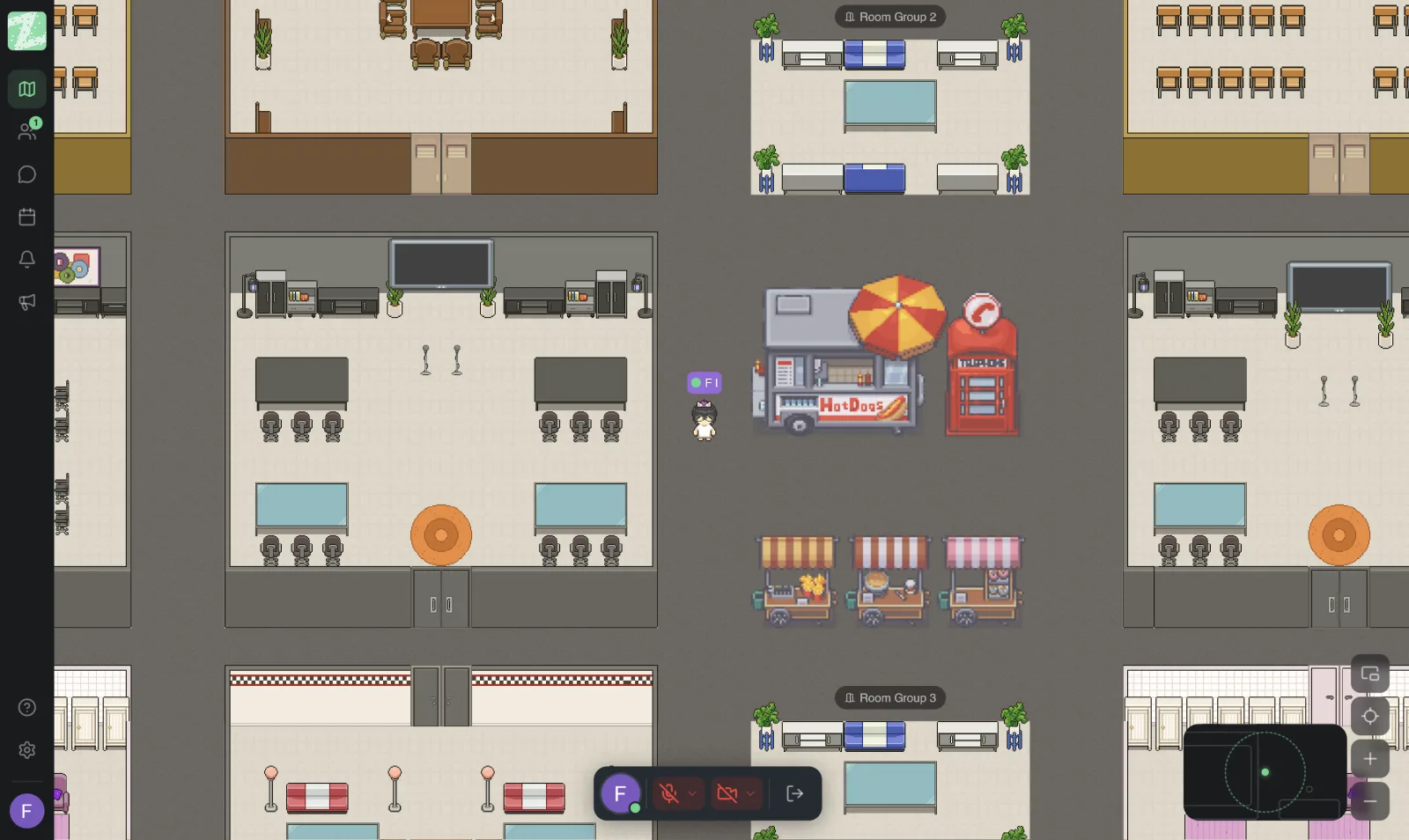
2. Gather: the best virtual office for exploring a shared space
Gather places movable avatars in a spatial workspace. Teammates walk up to each other to talk, so movement becomes part of starting a conversation.
This model suits teams that like a visible shared environment, but it is less direct than starting a call when everyone already knows who they need to talk to. For a detailed comparison, see Zyra vs Gather.
Gather pros
- Avatar movement makes walking up to a teammate obvious.
- A spatial layout separates different activities within one environment.
- Screen sharing supports working in sessions.
Gather cons
- Walking around the map adds effort before you can talk.
- The walk-around map format does not suit every team's working preferences.
Best for: Teams that like exploring a shared space they can see.
Verdict: a good fit for spatial interaction. Skip it if walking around the map feels like extra work.
3. SpatialChat: the best virtual office for fluid group conversations
SpatialChat uses position in a shared space to decide who can be heard. Participants can move between conversations instead of relying on separate calls, one at a time.
Choose this model when conversation groups need to form and shift as you go. Set clear room boundaries so participants know where to go and what they will hear.
SpatialChat pros
- Position-based voice supports moving between conversations.
- A shared space supports conversation groups that change.
- Screen sharing supports presentations and group discussion.
SpatialChat cons
- Audio boundaries need to be explained to new participants.
- Free-flowing conversation needs someone to run it when everyone must hear the same message.
Best for: Workshops and team meetings where conversation groups keep changing.
Verdict: a good fit for conversational flexibility. Skip it for presentations that need tight control.
4. Kumospace: the best virtual office for collaboration organized by floor plan
Kumospace organizes the virtual office around spaces where teammates meet and talk. Spatial audio makes position matter for conversation.
It suits teams that think in terms of work rooms and gathering areas. Give each area a clear purpose instead of expecting the floor plan to explain itself. For a detailed comparison, see Zyra vs Kumospace.
Kumospace pros
- Spatial audio supports talking with people nearby.
- The office layout gives activities a visible location.
- Screen sharing supports collaborative work.
Kumospace cons
- The purpose of each room needs clear team agreements.
- Being present in a space does not mean being available to be interrupted.
Best for: Teams that want office-style organization around daily collaboration.
Verdict: a good fit for room-based routines. Skip it if your team prefers direct calls.
5. WorkAdventure: the best virtual office for a spatial workspace that is open code and self-hostable
WorkAdventure is a platform with open code that you can install and modify yourself. It is built around walkable maps and proximity-based interaction. This spatial approach suits teams that want to control how their own environment is set up.
Treat customization as an operations burden, not only a creative advantage. Someone has to maintain the environment and explain how to use it.
A licensing note: WorkAdventure's code is under AGPL v3 with the Commons Clause, which is not open source as the OSI defines it and does not allow it to be sold as an online service. Check the terms with the developer before any commercial use.
WorkAdventure pros
- Open code and self-hosting give you more control over deployment.
- Custom maps tie the layout to the team's activities.
- Proximity-based talk supports informal interaction.
WorkAdventure cons
- A custom environment needs maintenance.
- A self-run installation needs a technical owner.
Best for: Teams with the capacity to maintain a customized spatial workspace.
Verdict: a good fit for customization. Skip it if no one will own the maintenance.
6. Frame: the best virtual office for immersive collaboration in the browser
Frame offers a shared 3D environment you reach through the browser. Participants gather in a spatial setting instead of a standard meeting grid.
It suits activities where the environment helps the activity itself. Provide an introduction when participants are not yet used to moving and interacting in a 3D space.
Frame pros
- Browser access is the way into an immersive space.
- The 3D environment supports spatial gatherings.
- Shared media gives an event something to talk about.
Frame cons
- Spatial controls take time to learn.
- An immersive environment adds little to simple status updates.
Best for: Teams that run immersive workshops or shared experiences.
Verdict: a good fit when the environment helps the activity. Skip it for routine updates.
7. Virbela: the best virtual office for campus-style environments
Virbela uses an avatar-based virtual environment, including campus-style spaces and event venues. It suits organizations that want a destination with several places to gather.
A campus model needs a reason behind it. Match each venue to a real activity instead of treating the environment itself as the outcome.
Virbela pros
- Avatars help create a shared sense of location.
- Different venues separate different kinds of gatherings.
- A spatial environment gives events a scene you can walk through.
Virbela cons
- Walking around a campus adds steps before a conversation starts.
- A large environment needs orientation and facilitators.
Best for: Organizations that plan to hold campus-style gatherings.
Verdict: a good fit for a campus-style experience. Skip it if you only need simple daily meetings.
8. Microsoft Teams: the best alternative for structured project collaboration
Microsoft Teams organizes collaboration through channels, chat, meetings and shared work. It is an alternative to a virtual office, not a spatial office you can walk around in.
Choose it when your main problem is keeping project conversations organized. Teams emphasizes clear destinations for work instead of simulating proximity between avatars.
Microsoft Teams pros
- Channels organize conversation by topic or group.
- Meetings and screen sharing support live work.
- Integration with Microsoft 365 supports shared documents.
Microsoft Teams cons
- It does not simulate proximity-based movement around an office.
- Organizing channels takes ongoing discipline.
Best for: Teams that value project structure and shared documents.
Verdict: a good fit for structured work. Skip it if you want to replace spatial presence.
9. Zoom: the best choice for meetings you schedule or start instantly
Zoom hosts meetings you schedule and meetings you start on the spot. People join for that call, and it ends. That differs from a virtual office that stays open through the working day, and many teams use both. See the detailed comparison at Zyra vs Zoom.
Zoom pros
- Supports both scheduled and instant meetings.
- A way for teammates to see and hear each other.
- Screen sharing.
Zoom cons
- People join for that call and it ends; it is not a space that stays open.
- A short conversation still needs someone to start a link or book a time.
Best for: Teams that want clearly scheduled meetings.
Verdict: a good fit for scheduled meetings and works alongside a virtual office. Skip it if an always-open space is all you need.
10. Discord: the best alternative for communities using permanent voice rooms
Discord combines text channels with voice rooms that participants can join directly. It suits groups that want a regular place to talk without a simulated office map.
Use channels to separate social conversation from focused work. Set access permissions and moderation rules before you make a community-style server part of your working routine.
Discord pros
- Voice rooms are clear destinations for conversation.
- Text channels separate discussion topics.
- Screen sharing supports live explanations.
Discord cons
- Voice rooms have no proximity-based interaction.
- A community-style setup needs clear boundaries around work.
Best for: Teams comfortable organizing collaboration around permanent channels.
Verdict: a good fit for voice-room collaboration. Skip it if spatial presence is a must.
How we ranked them
This 2026 ranking matches the interaction model each platform already has to a different use case. The criteria are conversation, shared work, presence, effort to join, continuity and space ownership, not scores from unpublished testing.
Spatial platforms come first because they answer the virtual office search directly. Microsoft Teams and Discord remain useful alternatives when what you really need is organized conversation, not a shared map.
Test how you work before you choose
Test every option on your 2026 shortlist with the same task. A useful starting exercise is a 20-minute session with 5 teammates, followed by a 1-week trial of the best fit. These figures are suggestions for testing, not product limits.
- Pick a task: Choose real work, such as reviewing a document draft or explaining a blocked task.
- Invite teammates: Include people with different levels of comfort with spatial software.
- Try it for real: Ask participants to find each other, start conversations and share work.
- Review the fit: Note who needed help and where, and whether the environment improved the work.
Compare the experience, not the novelty. A platform earns its place in your routine when teammates can explain what they use it for.
Which virtual office platform should you choose
Choose Zyra World as a starting point when proximity-based voice, chat, avatars and screen sharing match how you want to collaborate. Choose Gather for exploring a shared space, WorkAdventure for self-hosted customization, or Microsoft Teams when project structure matters more than spatial presence.
For a 2026 decision, start with the work you repeat and a clear owner. Do not open an always-on office just because remote work feels distant. Decide which interactions need a better home.
Frequently asked questions
Which virtual office platform is best for working close together as a team?
Zyra World suits remote teams that want proximity-based voice, chat, avatars and screen sharing in a shared workspace. Choose it when live interaction is the work you want to improve.
Is a virtual office better than Microsoft Teams?
A spatial virtual office suits location-based interaction, while Microsoft Teams suits channel-based project collaboration. Choose based on the work, and do not treat the two models as interchangeable.
How is Gather different from WorkAdventure?
Gather is a 2D virtual office, while WorkAdventure is a spatial platform with open code that you can self-host. WorkAdventure matters more for your shortlist when control over deployment is a key factor.
Do remote teams need avatars to collaborate?
No. Remote teams can collaborate without avatars. Avatars are a shared spatial reference, and channels, calls and written updates support collaboration without them.
Can a virtual office replace written updates?
No. A live virtual office does not replace written updates for teammates who are not there. Record decisions and next steps somewhere the whole team can find them.
How should I compare virtual office platforms in 2026?
Compare them by using the same real task in every space on your shortlist. Check conversation flow, screen sharing, effort to join, and where ongoing work should live.
One last thing
Choose your interruption rules before you choose an office layout. Tell teammates how to signal that they are focusing, and when walking up to them is welcome. Proximity-based voice creates a way to start conversations, but your team decides when those conversations should happen.
Want to try it with your team? Start using Zyra free for teams of up to 25 people. No credit card required.
Try Zyra with your team
Free for up to 25 members. It runs in your browser, so there is nothing to install.